How to Integrate Your POS with Your Business Systems
POS integration guide: connect point-of-sale to inventory, accounting, and CRM with event-driven sync, webhooks, and Odoo-native patterns that eliminate retyping.
When POS data stops at the register, finance and ops teams re-key sales into other systems—delaying closes and inviting errors. This guide explains event-driven POS integration patterns (APIs, webhooks, queues) and why Odoo deployments often achieve the tightest inventory and accounting alignment out of the box.
Why Your POS Shouldn't Be an Island
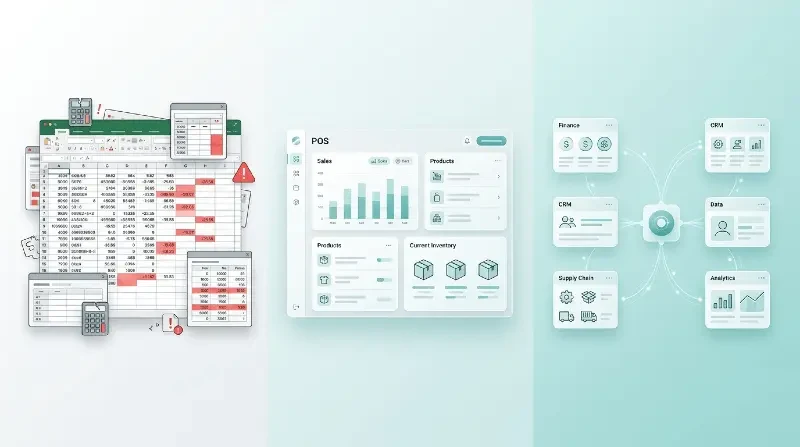
Your POS system knows exactly what you sold, when, and to whom. Your accounting system needs that data. Your inventory system needs that data. Your CRM needs that data. But in most businesses, these systems don't talk to each other — so someone manually transfers data between them, introducing delays and errors at every step.
Integration Architecture That Actually Works
The key to reliable POS integration is event-driven architecture. Every transaction triggers a real-time event that updates all connected systems simultaneously: inventory decrements, accounting entries post, customer points accumulate, and reorder alerts fire. No batch processing, no overnight syncs, no manual reconciliation.
We typically integrate POS systems using REST APIs and webhook listeners, with a message queue (like RabbitMQ or Kafka) as a buffer to ensure no data is lost during high-traffic periods. For Odoo-based setups, the integration is native — POS, inventory, and accounting share the same database.
MENA operators, POS integration, payments, and ERP synchronization, and realistic digital roadmaps
Chatbot solutions and AI agents sit on the same continuum as workflow automation: start with measurable KPIs (response time, order accuracy, days to close), pilot on one business unit, then expand once adoption stabilizes. That approach reduces risk for SMEs funding digital initiatives out of operating cash flow.
Teams in Lebanon, Qatar, Saudi Arabia, Iraq, and the wider GCC often ask the same question about POS integration, payments, and ERP synchronization: how to modernize without breaking day-to-day operations. Digital transformation is rarely a single product launch—it is phased workflow automation, clearer data ownership, and integrations that keep finance, inventory, and customer channels aligned.
FAQ-style checkpoints teams use before buying software
Do you need ERP implementation now, or better POS integration and inventory discipline first? Do mobile app requirements include offline capture for field teams? Will AI automation connect to audited sources, or only to public text? Answering these honestly keeps budgets aligned with outcomes.
Security, access control, and AI guardrails around POS integration, payments, and ERP synchronization
Role-based access should mirror how stores, branches, or warehouses actually delegate authority—not how IT imagines it on day one. For AI automation touching customer PII or payments, log prompts, model versions, and human approvals for irreversible actions so regulators and enterprise buyers see adult supervision.
Penetration tests and dependency scanning belong in the same roadmap as feature launches, especially for e-commerce development and marketplace payouts where fraud surfaces quickly. Treat security debt like inventory shrink: measure it, assign owners, and review monthly with the same discipline as gross margin.
Industry snapshots: retail, FMCG, logistics, and healthcare
Retail chains often start with POS integration and loyalty, then widen to Odoo ERP when inter-store transfers and promotional pricing need a single engine. FMCG distributors in Iraq and the Levant prioritize van sales accuracy, proof-of-delivery, and rebate tracking tied to ERP stock—because every route variance shows up in cash. Logistics operators need mobile app development that tolerates offline capture, while healthcare clinics balance appointment apps with strict access logs and audit trails.
Across these sectors, business intelligence dashboards only help when definitions match how finance closes the month. Tie dashboard refreshes to ERP cutoffs, name metric owners in writing, and review exceptions weekly—otherwise “digital transformation” becomes a slogan instead of measurable working capital improvements.
Finally, align your internal linking discipline the same way you align inventory: every major workflow should have a named system of record, a backup source, and an integration test that runs after each ERP or POS upgrade. That habit is what lets teams in Lebanon, Qatar, Saudi Arabia, and Iraq keep shipping features without freezing operations whenever a vendor ships a breaking API change.
Key takeaways before you brief a delivery partner
Treat POS integration, payments, and ERP synchronization as a portfolio decision: stabilize POS and ERP foundations, then customer-facing mobile experiences, then AI automation where data quality and governance can support it. Demand written acceptance tests for integrations, insist on bilingual enablement when your teams operate in Arabic and English, and keep one executive sponsor so trade-offs do not reset every sprint.
Conclusion: prioritize integrations, then scale intelligence
Whether your next step is Odoo ERP, a customer-facing mobile app, or AI automation, sequence the work so each release removes manual reconciliation. Weave Wider supports Lebanon and GCC rollouts with bilingual workshops, documentation, and handover packages when your IT team wants ownership. Book a consultation to translate this article into a scoped plan with timelines and integration risks spelled out upfront.